Voice typing for Windows and Mac
Stop typing,
start speaking.
Hold one key and talk. Your words appear in any app.
Typally is a Mac and Windows app. Leave your email and we'll send the download link, with 14 days of Pro free.
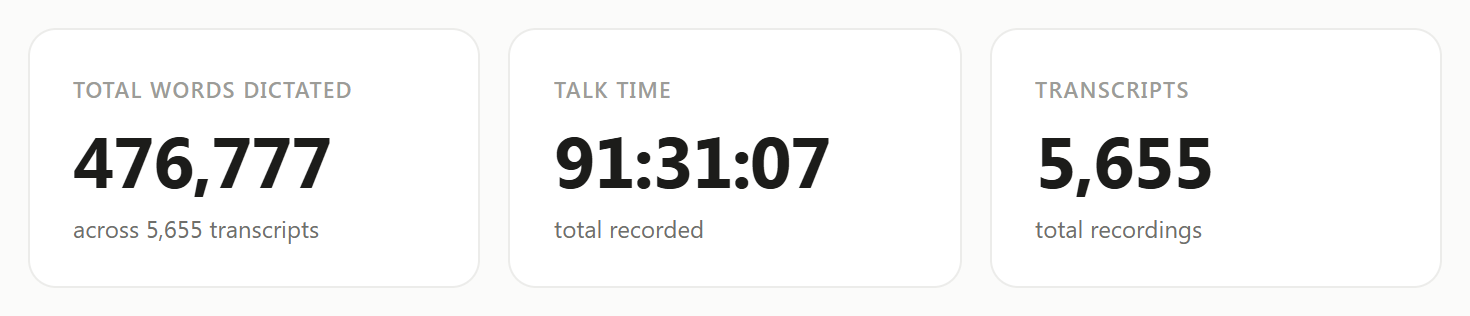
 476,777 words dictated with Typally, on 97 of the last 98 days. Mantrijus, founder
Typally in 40 seconds
For people who write all day
3× faster than typing.
People speak about 150 words a minute and type about 40. So say the whole thing: the long Slack reply, the email, the full brief to ChatGPT or Claude, in the time a short version takes to type.
How it works
Speak at the speed you think,
in every app.
Speak naturally
Ramble, pause, change your mind halfway. Unlike phone dictation, Typally drops the ums and the repeats, adds the punctuation, and types the sentence you meant.
Hold a key, let go
Hold Ctrl + Win (fn on a Mac), or any key you choose, while you talk, wherever the cursor is. Let go, and about a second later the text is there.
Use it anywhere
Nothing to open, nothing to paste. Gmail, Slack, Word, WhatsApp, a browser form, a code editor: if you can type there, you can talk there.
Works in every app
Gmail, Slack, Word, WhatsApp — anywhere you can type.
Typally types into whatever window has your cursor. Nothing to paste, no plugin per app.
From the founder
476,777 words. I typed almost none of them.
I built Typally because I had more to say than I could type. Since then I've used it on 97 of the last 98 days.
Typally is still young: I'm building it with my partners in Vilnius. If something doesn't work, write to me.
Mantrijus, founder of Typally
English coach, built in
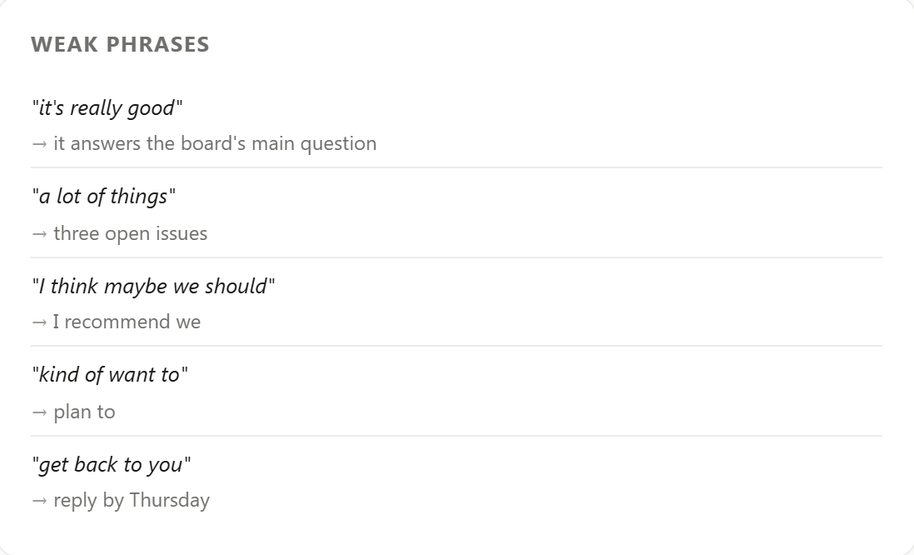
It types what you say, then shows you the mistakes you keep making.
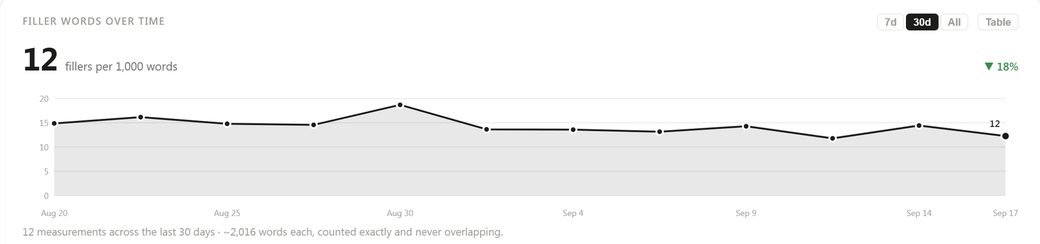
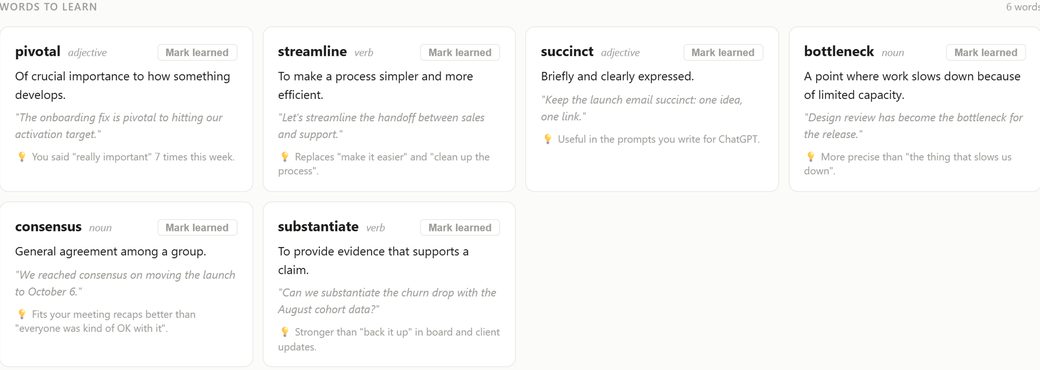
Every sentence you dictate is practice. Typally reads it back: the phrases to drop, the fillers to lose, the words to pick up.

100 languages.
English, Spanish, German, French, Lithuanian and 95 more, typed with the right accents and punctuation. Pin your language once in Settings, or let Typally work it out.
It learns your words.
Names, products, jargon. Add them to your vocabulary once and Typally spells them right every time, in every app.
Beyond dictation
Most dictation apps stop at the text. Typally keeps going.
Everything you say is already written down. Typally uses that to map what you think about and to write your meeting notes.
A living map of what you talk about.
Typally turns each day's dictation into linked notes and draws the map: the projects, people and ideas that keep coming up, and how they connect. Click a node to read what you said about it.
Meeting notes, written for you.
Record a call and get a summary, key topics and action items with each speaker named. On Google Meet it starts and stops on its own, and the notes are waiting when you hang up.
Privacy
Your voice stays yours.
Dictation means trusting an app with what you say before anyone else hears it. Here is what Typally does, and how to check it yourself.
The mic is closed until you hold the key.
No wake word, no background listening, nothing running between dictations.
Check it: Windows shows a mic icon in the taskbar (macOS, an orange dot) whenever an app is using the microphone. Hold the key and it appears. Let go and it is gone.
Your transcripts stay on your computer.
Your history, your stats, your coaching and your mind map are stored on your machine. We keep no copy.
Which means: there is nothing for us to read, hand over or lose.
Your audio is never stored.
What you say is turned into text over an encrypted connection and discarded on the spot.
And no trackers: the app carries no advertising or analytics code of any kind, and we never sell your data.
Pricing
Free to use. Unlimited when you want it all.
100 minutes of dictation every month. No card, nothing to cancel.
- 100 min/month of voice typing
- Works in every app on your PC or Mac
- AI polish on every transcript
- Speech coach and your own stats
- Audio file transcription
- Transcripts stay on your device
First 14 days free, then $11.99 a month. Card required; cancel before day 14 and you pay nothing.
$96 billed once a year. A third less than paying monthly.
- Unlimited dictation
- Everything in Free, plus:
- Meeting recording with AI notes
- Speaker names and action items
- Mind map of everything you dictate
Unlimited dictation is subject to fair use: a 2,000 minute monthly ceiling, about an hour of speaking every day. See the full pricing page for the Free against Pro table and every billing answer.
Try it free
No signup. Try it right here in your browser.
Free audio to text converter
Upload an MP3, M4A, WAV or voice memo and get an accurate transcript in seconds. Free, no signup.
Free voice to text online
Dictate in your browser and copy the text anywhere. A small taste of what the desktop app does everywhere.
Guides & comparisons
Honest comparisons, including when a rival is the better pick.
Dictate in any app
308 guides: Google Docs, Gmail, Slack, Notion, Word and the rest. What each app's built-in dictation does, and where it stops.
Typally vs Wispr Flow
Price, privacy and features compared honestly, including when Wispr Flow is the better pick.
Wispr Flow alternatives
Five real options from free (Win + H) to heavyweight (Dragon), with straight talk on trade-offs.
Voice dictation for Claude Code
Speak long prompts into Claude Code, Cursor or ChatGPT without cutoffs.
Questions
Questions, answered.
Which apps does Typally work with?
All of them. Typally types into whatever window has focus, exactly as if you'd typed it: email, chat, documents, browsers, editors, terminals, anything on Windows or macOS.
How accurate is it?
Typally uses Whisper large-v3, one of the most accurate speech models available, plus an AI cleanup pass that fixes punctuation and removes filler words. It handles accents and technical vocabulary well, and you can teach it custom terms.
Is Typally listening all the time?
No. The microphone opens when you hold the shortcut and closes the moment you let go. There is no wake word and nothing listening in between, and your own computer will confirm it: Windows shows a microphone icon in the taskbar, macOS an orange dot, whenever an app uses the mic. Hold the key and it appears; let go and it is gone. How your voice is handled.
Is my voice data private?
Yes. Audio is sent over an encrypted connection, turned into text, and discarded on the spot, so no recording of you is ever stored. Your transcripts, history, coaching and mind map are kept on your own computer — we have no copy, so there is nothing for us to read or hand over. The app contains no advertising or analytics trackers, and we never sell your data.
Is it safe to install?
Yes. On Windows, Typally comes from the Microsoft Store: Microsoft tested it before listing it, and the installer is signed by Microsoft. The Mac build is signed with an Apple Developer ID and notarized by Apple, so it opens with one click.
What does the coach actually measure?
It reads your recent transcripts and scores vocabulary, grammar, fluency, fillers and variety out of 100, with a short honest note on what to work on. It also counts filler words per thousand, tracks how many different words you use per thousand spoken, and keeps a history so you can see the trend.
Does it work offline?
No. Transcription runs in the cloud for accuracy, so you need an internet connection while dictating. Your saved history stays readable offline.
What languages are supported?
Dictation works in 100 languages: English, Spanish, German, French, Lithuanian and 95 more. You can pin your language in Settings for best accuracy.
Is there really a free plan?
Yes. Every account starts on it: 100 minutes of dictation every month, forever, roughly 15,000 spoken words. No card, and nothing to cancel. Pro makes dictation unlimited and adds meeting recording with AI notes.
What does Pro cost?
$11.99 a month, and the first 14 days are free. Or $96 a year, charged upfront, which works out to $8 a month and saves 33%. The yearly plan has no free trial.
How does the free trial work?
Pro is free for 14 days. You add a card to start, and you are not charged during the trial. When it ends, it becomes a monthly subscription at $11.99 unless you cancel first. Cancel before day 14 and you pay nothing, and you stay on the free plan.
What happens when I use up my free minutes?
Dictation pauses until the 1st of the next month, when your allowance resets. Everything you've already transcribed stays on your device. You can upgrade at any time to keep going immediately.
How do I cancel?
In the app: Settings → Account → Manage subscription. Cancel during the free trial and you are never charged. After that, cancellation takes effect at the end of the billing period, no questions asked, and you drop back to the free plan rather than losing access.
Ready to stop typing?
Install Typally, hold a key, and say what you were about to type.